Connectors
Filings, External Data, and Internal Notes in the Same Answer
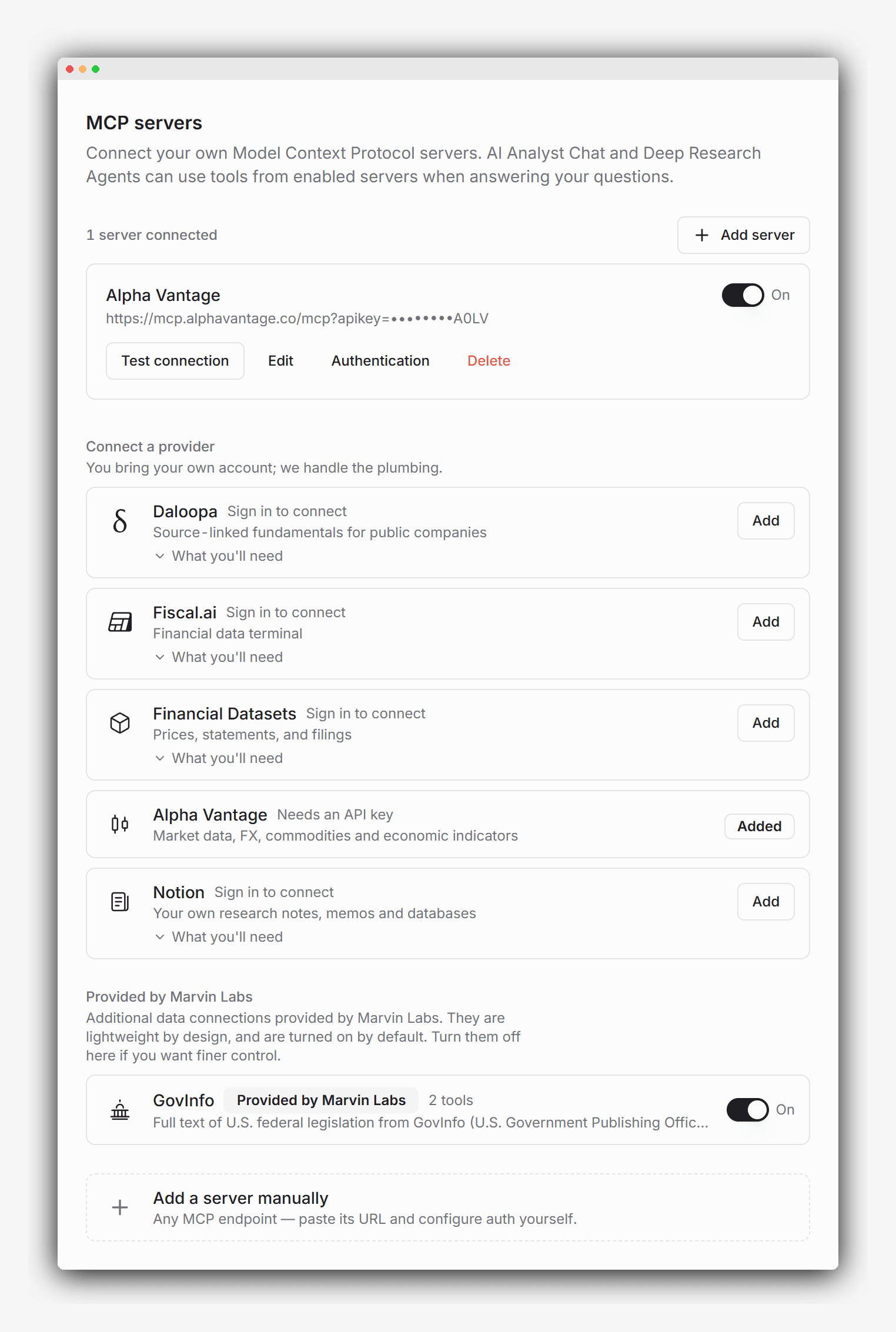
Connect fundamentals, estimates, expert networks, alternative data, or your own notes, and Chat and agents can draw on them alongside the filings, earnings calls, and press releases Marvin Labs already reads. Some sources we run. The rest take a sign-in or one key.
15+ companies. 1,500 AI credits. No sales call needed.






Chat and Agents Reach What You Connect
Connectors are how AI Analyst Chat and Deep Research Agents reach the external data you already use (fundamentals, estimates, expert networks, alternative data) and the notes your firm already keeps, in the same answer as the filing. Every figure that comes back is attributed to the source it came from.
The sources Marvin Labs provides are on from the day you start. For the rest, you sign in with the provider or paste one key, and the setup steps are already filled in.
68 connectors available
Fundamentals

Daloopa
Bring your own account
Source-linked fundamentals, KPIs and guidance for public companies

Fiscal.ai
Bring your own account
Standardized financials, segment KPIs, transcripts and filings

Financial Datasets
Bring your own account
Statements, prices, SEC filings, insider trades and news

Financial Modeling Prep
Bring your own account
Fundamentals, quotes, transcripts and insider trades

Morningstar
Bring your own account
Morningstar ratings, fair values and research articles
FactSet
Bring your own account
Fundamentals, estimates, prices, ownership and M&A

S&P Global
Bring your own account
Capital IQ financials, transcripts, M&A and market data

Quartr
Bring your own account
Earnings calls, transcripts, slides and filings

Zacks
Bring your own account
Standardized financial statements for North American stocks

FinancialReports
Bring your own account
Regulatory filings and standardized financials, 60 markets

GuruFocus
Bring your own account
Guru portfolios, insider trades, GF Value and fundamentals

Equibles
Bring your own account
SEC filings, transcripts, 13F, insider and congressional trades

sec-api.io
Bring your own account
EDGAR filings since 1993, full-text search and parsed forms

ROIC.ai
Bring your own account
Statements, ratios, transcripts and prices for 60,000+ companies
Market data

Alpha Vantage
Bring your own account
Stocks, FX, commodities, fundamentals and economic indicators

MSCI
Bring your own account
Index analytics, benchmarks and private capital data

LSEG
Bring your own account
Cross-asset pricing, curves and analytics
TipRanks
Bring your own account
Analyst ratings, price targets and insider activity

Twelve Data
Bring your own account
Global prices, technical indicators, fundamentals and ETFs

Massive
Bring your own account
U.S. stock and options data, plus indices, FX and futures

Intrinio
Bring your own account
US stock prices, options chains, fundamentals and estimates

YCharts
Bring your own account
Model portfolios, fund analytics and economic indicators

EODHD
Bring your own account
Global end-of-day prices, fundamentals, options and macro data

Fintel
Bring your own account
Institutional ownership, insider trades and short interest

Unusual Whales
Bring your own account
Options flow, dark pool prints and congressional trades

Compound Interesting
Bring your own account
Insider, congressional and 13F signals on U.S. stocks
Danelfin
Bring your own account
Daily AI scores for US and European stocks and US ETFs

SEC Fails-to-Deliver
Provided by Marvin Labs
Shares that failed to settle, by U.S. security and date
Private markets


Credit and risk

Expert networks



News and wires


Macro and energy

FRED
Provided by Marvin Labs
U.S. and international economic indicators from FRED (Federal Reserve Bank of St. Louis): CPI, GDP, unemployment, policy rates and Treasury yields, to read a company's numbers against the macro backdrop.

EIA
Provided by Marvin Labs
Energy statistics from the EIA (Energy Information Administration): U.S. petroleum and natural gas production, stocks, refining and trade, coal and electricity from the cross-fuel series, EIA's own short- and long-term price and output forecasts, and world coverage by country for every fuel.

Ember
Provided by Marvin Labs
Global electricity data from Ember: how every country makes its power, by fuel, with installed capacity, demand, power-sector emissions and grid carbon intensity, yearly for 215 countries and monthly for 88.

CFTC
Provided by Marvin Labs
Futures positioning from the CFTC (Commodity Futures Trading Commission): the weekly Commitments of Traders report, for who was long and who was short while a price moved.

Bundesbank
Provided by Marvin Labs
German government bond yields from the Deutsche Bundesbank: the daily term structure of listed Federal securities, one to thirty years, where FRED carries only a monthly figure.
Central Bank Speeches
Provided by Marvin Labs
Official speeches from major central banks. List speeches, read their text and explore attributed passages about monetary policy and the economy.
Government and regulatory

GovInfo
Provided by Marvin Labs
Full text of U.S. federal legislation from GovInfo (U.S. Government Publishing Office): search every bill's text, then read it.

CourtListener
Bring your own account
U.S. court opinions, dockets and judge profiles

Quiver Quantitative
Bring your own account
Congressional trades, lobbying and government contracts

FDA
Provided by Marvin Labs
Advisory committees, response letters, approvals, patents and recalls

ClinicalTrials.gov
Provided by Marvin Labs
Registered clinical trials with phases, status and readout dates

USAspending
Provided by Marvin Labs
Federal contracts, grants and loans awarded to a company
Brokerage and portfolio

Your call transcripts

Granola
Bring your own account
Your meeting notes and transcripts, captured without a bot

Otter.ai
Bring your own account
Transcripts of your Zoom, Teams and Meet calls

Fireflies.ai
Bring your own account
Meeting transcripts, summaries and action items

Fathom
Bring your own account
Summaries, transcripts and action items from your calls

Read AI
Bring your own account
Meeting reports with transcripts, summaries and metrics

Avoma
Bring your own account
Meeting and dialer call transcripts, notes and outcomes

Grain
Bring your own account
Meeting recordings, transcripts, notes and deal data

tl;dv
Bring your own account
Transcripts and notes from your Meet, Zoom and Teams calls

Fellow
Bring your own account
Meeting summaries, transcripts, decisions and action items

Krisp
Bring your own account
Transcripts, notes and action items from your calls

Circleback
Bring your own account
Meeting notes, transcripts and action items

MeetGeek
Bring your own account
Meeting transcripts, summaries and highlights

Jamie
Bring your own account
Meeting notes, transcripts and tasks

Bluedot
Bring your own account
Transcripts and summaries of your recorded meetings

Tactiq
Bring your own account
Transcripts and summaries of Meet, Zoom and Teams calls

Supernormal
Bring your own account
Meeting notes and action items from your meeting history

Leexi
Bring your own account
Call recordings, transcripts, summaries and follow-ups
Your own workspace


The directory is the set we have researched and written setup guidance for, grouped by the kind of data each one returns. A source that is not listed can still be added by hand.
You Can See Where the Figure Came From
Ask for a 40-day price series and a market-data connector returns the points, rendered as a chart, with the source visible in the thread. The same thread can put an adjusted operating margin from your fundamentals provider next to the as-reported figure from the last 10-Q, each linked to where it came from.
A hosted connector such as GovInfo or FRED works the same way for a bill or a policy rate. A Notion connector does it for a memo you or a colleague wrote. The answer shows what came from the connector and what came from a filing, so you can open either one.
Set Up With a Sign-In or a Single Key
Sources provided by Marvin Labs need nothing from you. We run them and hold the keys, so there is no address to find and nothing to paste. They are on when you start, and settings has a switch to turn each one off. Public data belongs here: statistics, legislation, and other collections where there is no account to bring.
For a third-party source, you bring your own account with the provider. We ship the setup steps: where to sign up, where the key lives, which plan is required. Connecting is a sign-in with the provider, or one pasted key. The directory above shows which is which. The relationship with the provider stays yours. We do not resell anyone's data.
Keys get the same protection as everything else in your workspace, AES-256 at rest and TLS in transit. Each source has its own switch. You decide which providers and internal systems to trust.
Start your free evaluation
Ask questions and run research agents on the evaluation companies with 1,500 AI credits. Free evaluation account. No sales call.
Filings Still Come First
Connecting a source does not change where an answer starts. When a question can be answered from the filings, earnings calls, and press releases Marvin Labs Labs ingests through Automated Data Import, it is answered from those, with a citation you can open. That content is validated and consistent across AI Analyst Chat, Deep Research Agents, Guidance Scorecard, and Sentiment Analysis. Connected sources do not override it.
Chat and agents reach for a connected source when the question needs data those documents do not hold: normalized fundamentals, consensus estimates, an expert call, a memo. Connecting a dozen of them does not slow an answer down.
Add a Source the Catalog Does Not List
If a provider or an internal system is not in the directory, you can still connect it. Add it in settings with the sign-in the provider asks for. That is how you bring in a system your firm already runs, or a provider we have not added yet. You use the account you already have.
New Sources Every Month
We are at 68 sources across 11 categories today, spanning fundamentals, market data, private markets, credit and risk, expert networks, news and wires, macro and energy, government and regulatory, brokerage and portfolio, your call transcripts, and your own workspace. We add new sources every month. If you want a specific source added, contact us at marvin@marvin-labs.com.
Frequently asked questions
Recent updates
Full changelogConnect the notetaker you already use for expert calls, management meetings and internal discussions, and chat and agents can read those transcripts next to a company's own documents. The catalog has a new Your call transcripts section with 17 of them, including Granola, Otter.ai, Fireflies.ai, Fathom and Read AI. Each page says what the connector reads and which of the provider's plans include it.
Read moreWhen one of your connectors fails during a chat, the answer now says which one and what to do: sign in again, update its key, or wait if the provider is down. A bar above chat and Deep Research Agents lists any connector that needs you to sign in again, with a Reconnect button for each.
Read moreWhen a connector returns more than fits in one answer, such as a long export from your own data provider, chat now keeps the whole result and reads further into it as needed, instead of working from a cut-down preview.